Works with any US property listing — Zillow, Redfin, Realtor.com, MLS pasted addresses
Underwrite deals in seconds
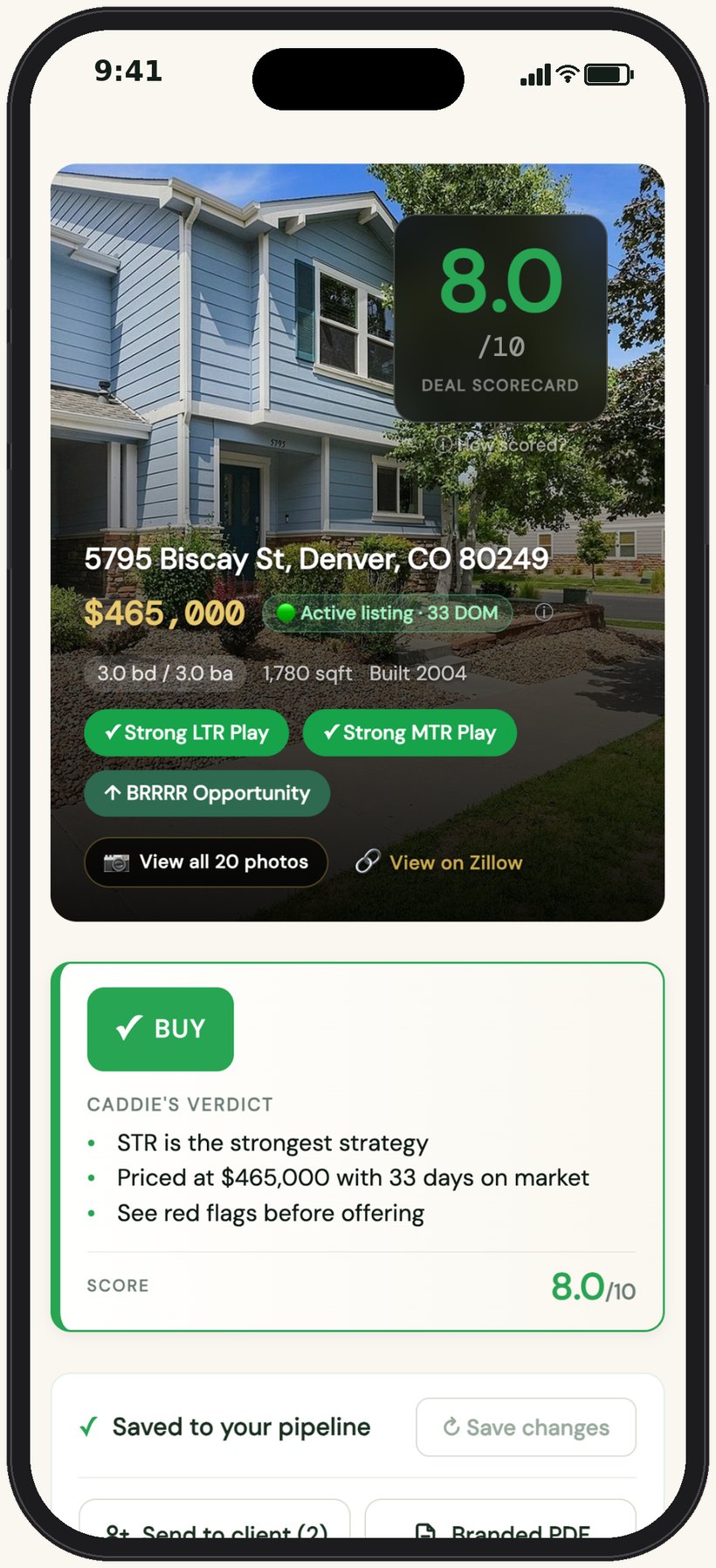
A full underwrite used to be 10–15 minutes in a spreadsheet, per property, chasing down the tax bill, the insurance quote, the rent comps — before you even knew if it was worth a call. Now it’s one paste, on your phone, between showings. Here’s everything that comes back.
- Deal Score out of 10 with a Buy / Watch / Pass verdict
- Fixed costs pre-filled — rate, down payment, loan term, closing, taxes, insurance, HOA, PMI — recalculated live as you edit
- Multifamily handled, with rent set per unit
- Cashflow for LTR, MTR, STR, Section 8, House Hack, BRRRR and Fix & Flip
- Caddie’s Take: the call, red flags, market outlook, best strategy, value-add
- Photo scan that flags condition issues and CapEx before you tour
- Max Offer for the return you want
- Comps and a suggested offer range
- Projections up to 30 years out, against an index fund
- Ask your Caddie anything about this deal
- Share it as a live link or PDF
Address in, decision out
Hundreds of new listings a week, and the only way to know which ones pencil is to run each one. You can’t, so you guess. DealCaddie runs every address you paste — comps, taxes, insurance, STR rules — and scores it across all seven strategies before you’ve finished the photos.
- All 7 strategies on one screen, so you never miss the play that actually works
- County tax, state insurance and market rent pre-filled — no more $100/mo placeholders
- Change any assumption and everything recalculates live

Max Offer Calculator
You know the return you need. The seller knows the price they want. The gap between those two numbers is where deals are won, and most investors find it by trial and error at the table. Type your target return; DealCaddie tells you the most you can pay and still hit it.
- Slide the target return; the offer updates as you drag
- Cash-on-cash, cap rate or cashflow — for any strategy
- Walk in knowing your ceiling before they name a price

Share pages built for the reader
Your partner wants the numbers. Your lender wants the numbers. Today that’s a screenshot of a spreadsheet and a wall of text. One link opens the full analysis for anyone, no login, with only the strategies you want them to see and a note in your own words.
- Show only the strategies that matter to that reader
- Your note at the top, your name on the page
- Revoke a link any time from your pipeline
Cancel anytime. No contracts.
An analyst that has read the whole deal
You’d pay a good analyst to read every listing you are serious about. You can’t afford to, so you skim. Caddie reads the numbers, the comps and the listing, tells you what it would do — and argues back when you push.

Plain-English verdict on every deal
Numbers tell you whether a deal works. They don’t tell you why, what could go wrong, or what to say to the seller. Every analysis comes with Caddie’s Call, the Market Outlook, the Best Strategy, Value-Add plays and Red Flags — the memo an analyst would write, if you had one.
- Specific negotiation angles and price targets
- Red flags surfaced before you commit, not after inspection
- Re-runs any time you change assumptions

Ask anything about the deal
The questions come at 10pm. What if I put 25% down? Is the HOA a problem? Could this work as a mid-term? Ask Caddie. It already has this deal’s numbers and your assumptions loaded, so the answer is about this property, not a generic article.
- Property-specific Q&A
- Strategy comparisons and trade-offs, with the numbers
- Uses your saved assumptions, not defaults

Up to 30 years out, in one chart
“Is this better than the index fund?” is the question every partner asks and nobody can answer on the spot. Drag appreciation, rent growth and holding period, from one year to thirty; equity, loan balance and net proceeds redraw live, next to what the same cash would have done in the S&P.
- Annualized ROI against a 7% S&P benchmark
- Cashflow breakeven: the year the down payment comes back
- Year-by-year table for your lender or partner

Comps with a take, not just a table
A comps table tells you what sold. It doesn’t tell you whether this asking price is fair, or what to offer. Caddie reads the comps and says it plainly: the price is 5% over the neighborhood, anchor at $443K, and here’s why.
- Comp average, price-per-sqft, and days on market at a glance
- An AI-suggested offer range with the reasoning behind it
- Flags when a list price runs ahead of the comps
Stop searching. Start choosing.
You spend hours a week scrolling listings you think might work, then running the ones that look close. Set a buy box once — price, beds, cashflow floor, strategy — and every morning DealCaddie underwrites the new listings that fit and shows you which ones actually cash flow. The deals come to you.
A map of what pencils
Every pin is a listing DealCaddie already underwrote against your targets. Green hits. Gold is close. Red isn’t worth the click. You stop opening tabs and start opening the three that matter.
- Daily alerts by push and email when a match lands
- Draw your own search area on the map
- Tap any pin to underwrite it on the spot
A pipeline that keeps itself honest
The spreadsheet of deals you are watching goes stale the day you make it. DealCaddie sweeps your saved deals for sold and pending, so you hear it from the app, not from the listing agent after you’ve run the numbers twice.
- Sort by score, cap rate, cashflow or price
- Card, compact and map views
- Client rankings and share views show right on the card

Send the numbers, not the listing.
Twelve investor clients. Texts, emails, Zillow links, Redfin screenshots, a spreadsheet you rebuilt last week. Which message was about which property? DealCaddie puts every deal you send in one private portal, with your name on it, and your clients rank, react and ask their questions right there.
One link per client. No login.
Your client wants to know what a property earns, not what it looks like. Each one gets a private page of the properties you chose for them, the numbers you ran in seconds, and a two-line note on why each made the list. They drag them into their own order, mark Interested or Pass, and you see it the moment they do.
- Your headshot, brokerage and contact on every page
- Rankings and reactions sync back to your Clients tab
- You decide which strategies and sections each client sees
Every question lands on the property it is about.
“Does this one cash flow?” arrives by text with no address. You scroll up. You guess. With DealCaddie, clients message you from the portal, so every question is already attached to the property it is about, and you reply from the app or your inbox.
- Unread badges on the tab bar, the client and the deal
- Quick replies for the things you type ten times a day
- Read receipts, so you know they saw the numbers


Your side of the portal.
This is mission control. Every client, every deal you’ve sent them, every reaction, in one place. Add a deal from your pipeline with one tap, let Caddie draft the write-up from the numbers, and see who’s looked and who hasn’t.
- Drag to reorder; what you see is what they see
- Deal alerts from a buy box, reviewed before they go out
- Portal views and last-seen, per client
The PDF that closes the meeting.
A client packet used to be an evening: screenshots, a cover page, your logo pasted in. One tap builds it — a cover with their ranked shortlist and your write-ups, then a full report per property with the photo, the seven-strategy cashflow, the comps on a map and Caddie’s Take. Your headshot and brokerage on every page.
- Respects the same per-client strategy and section settings
- Email it, AirDrop it, or hand them the link
- Share pages carry the same branding and a lead-capture card


Every great golfer has a caddie helping them read the greens, judge the distance, and select the right club. DealCaddie does the same thing for real estate investors.
We read the greens. You take the shot.
Other tools make you guess.
DealCaddie already knows.
Every calculator makes you type the tax rate, the insurance, the rent. You don’t know them, so you type $100 and hope. DealCaddie fills them in from the source — county, state, ZIP — labelled, and editable if you disagree.
Market rent
Rent comps for this address and bed count — not a city-wide average. Shown with the comps behind it.
RentCast · MLS-backedCounty property tax
The effective rate for the county the property sits in, labelled on screen so you know what it is based on.
Tax Foundation county ratesInsurance estimate
State homeowner averages pre-loaded, so you stop typing $100/mo and being off by hundreds.
NAIC & Insurify averagesShort-term rental
Nightly rate and occupancy from live Airbnb listings near the property, plus a legality check in 35 major markets.
Live Airbnb compsMid-term rental
Furnished 30-day pricing pulled from real listings in the city — travel nurses, relocations, corporate stays.
Furnished Finder listingsSection 8
The actual payment standard for the property’s ZIP code, not a metro-wide figure — current HUD fiscal year.
HUD Small Area FMREvery figure is an editable starting point. Change any assumption and all seven strategies recalculate instantly.
Most investors check one play.
You will see all seven.
You run the numbers as a rental and pass. Someone else runs it as a mid-term, or a house hack, and buys it. The same property is a mediocre rental and an excellent something else. DealCaddie scores every strategy side by side, so you’re the one who sees it.
Long-Term Rental
Traditional buy-and-hold. Scored on cap rate, cash-on-cash return, and monthly cash flow with stabilized long-term rents.
Buy, Rehab, Rent, Refi
Targets undervalued or distressed properties with equity upside. AI estimates ARV, rehab costs, and post-refi cash flow.
Short-Term Rental
Airbnb & VRBO focused. Includes STR legality check in 35 major markets and projected gross revenue based on comparable listings.
Mid-Term Rental
Furnished 30-day+ rentals targeting travel nurses, remote workers, and corporate housing. Higher yield than LTR in most markets.
Section 8 / HCV
Government-guaranteed rent via Housing Choice Voucher program. Scored against HUD Fair Market Rents for maximum yield assessment.
House Hack
Live in one unit, rent the others. AI calculates effective housing cost reduction and path to living for free or cash-flowing.
Fix & Flip
Buy, renovate, sell. Caddie projects rehab cost, ARV, holding costs, and total profit — with ROI and max allowable offer, not monthly cashflow.
From people who underwrite deals every week
Built for the people who analyze deals every day — agents, full-time investors, and out-of-state buyers.
As a realtor, I am able to use DealCaddie to analyze and share financial estimates across all strategies to my clients within seconds from my car between showings.
On any given day, I analyze 15–20 properties to crunch the numbers. I used to use a spreadsheet where I’d have to create a new file for each property. Now I can pull up DealCaddie, use one of my saved templates, and copy/paste an address to run an analysis. Saves so much time.
I’m an out-of-state investor that normally guesses on local rent, property tax, and insurance estimates in different counties around the country. DealCaddie does this for me automatically, and is highly accurate. Saves me a bunch of time and guesswork when I’m underwriting deals.
Start free. Upgrade when you’re ready.
No contracts. No credit card to start. Cancel anytime.
Try DealCaddie risk-free.
- ◆ 5 analyses per month
- ◆ Verdict + Caddie’s Call + Red Flags
- ◆ 2 pipeline saves + 1 share link
- ◆ 3 AI chat questions per deal
For investors building a shortlist.
- ◆ 25 analyses per month
- ◆ + Market Outlook + Best Strategy
- ◆ 10 pipeline saves + 3 templates
- ◆ 10 AI chat per deal + unlimited shares
For active investors & serious deal flow.
- ◆ Unlimited analyses + pipeline
- ◆ Buy Box: deals found daily, on a map
- ◆ Max Offer Calculator + comps map
- ◆ Value-Add + Listing Photos AI, sold alerts
For agents with investor clients.
- ◆ Everything in Investor Pro
- ◆ Client portals with ranking and messaging
- ◆ Branded PDF packets and share pages
- ◆ 10 buy boxes with daily alerts
Answers before you ask
Everything real investors want to know before trusting the numbers.
Where does your rent and property data come from? +
Long-term rent comps and property details come from RentCast, which is MLS-backed. Short-term nightly rates and occupancy come from live Airbnb listings near the property. Mid-term pricing comes from Furnished Finder listings in that city. Section 8 uses HUD Small Area Fair Market Rents for the property’s ZIP code. County property tax rates come from Tax Foundation county data and insurance from state averages. All of it auto-populates the moment you paste an address — each figure labelled with its source, and editable if you disagree.
Is my saved data private? +
Yes. Your analyses, pipeline, and custom templates stay private to your account, and your data is never sold or shared. Public share links only expose the specific analysis you explicitly share, and you can revoke them at any time.
Does DealCaddie replace my spreadsheet or CPA? +
No — DealCaddie is a pre-offer screening tool. Use it to quickly filter out bad deals and identify promising ones in seconds instead of spending 15 minutes per property. Once you’re serious about a specific deal, your CPA, lender, and detailed pro-forma still have their place.
How accurate are the STR revenue estimates? +
Nightly rate and occupancy come from live Airbnb listings near the property, so they reflect what comparable places actually charge rather than a metro-wide average. They are calibrated for screening — accurate enough to kill a bad deal and flag a promising one. Before you commit, validate against the specific listings you would compete with. DealCaddie also checks short-term rental legality in 35 major markets and tells you when owner-occupancy or licensing rules would block the strategy.
Can I use DealCaddie for multi-family properties? +
Yes. DealCaddie auto-detects 2–4 unit small multifamily properties and scales rent, expenses, and cashflow per unit across every strategy (LTR, MTR, STR, Section 8, House Hack, BRRRR). Larger commercial multifamily (5+ units) isn’t fully supported yet.
Does DealCaddie analyze fix & flip deals? +
Yes. Fix & Flip is one of seven strategies run on every analysis. Caddie pre-fills your rehab estimate, ARV, and holding costs, then projects total profit, ROI, and your maximum allowable offer. Every input is editable, so you can dial in your own numbers before you bid.
What happens to my data if I cancel my subscription? +
Nothing is deleted. Your pipeline, saved analyses, templates and client shortlists stay in your account, and you can open every one of them. You drop to the Free plan’s limits for new analyses and saves, and paid features such as buy boxes, client portals and unlimited AI chat pause until you resubscribe.
Do I need a credit card to try it? +
No. The Free tier gives you 5 analyses per month, 2 pipeline saves, and a shareable deal link — all without a credit card. Upgrade to Investor ($15/mo), Investor Pro ($29/mo) or Agent ($99/mo, 7-day free trial) whenever you’re ready. No contracts, cancel anytime.
Is there a plan for real estate agents? +
Yes. The Agent plan ($99/mo or $990/yr, with a 7-day free trial) adds client portals, per-property messaging, branded PDF packets and share pages with your headshot and logo, per-client control of which strategies and sections they see, and ten buy boxes with daily alerts. See how it works ↑
Does DealCaddie find deals for me? +
On Investor Pro and Agent, yes. Set a buy box (market, price range, beds, cashflow floor and the strategy you run) and DealCaddie underwrites the new listings that fit it every day, pins them on a map, and alerts you by push and email. Saved deals are also swept for sold and pending status so your pipeline stays current.
That deal you’re looking at
won’t wait for anyone.
Paste the address and get the full underwrite before you finish your coffee.
No credit card · 1 free analysis before sign-up · Powered by AI